Showing posts with label Iphone. Show all posts

Wednesday, 20 June 2012

Facebook Acquires Face.com Making Facial Recognition Great


As Face.com has officially posted this news on their blog. As said by the main team member Gil on Face.com that they try to find new ways to take their facial recognition to a new level and tying their knot with the second largest internet company Facebook.com they have committed a safe developing future for their technology.

Face.com
We love building products, and like our friends at Facebook, we think that mobile is a critical part of people’s lives as they both create and consume content, and share content with their social graph. By working with Facebook directly, and joining their team, we’ll have more opportunities to build amazing products that will be employed by consumers – that’s all we’ve ever wanted to do.  :)

Still there is no proper news about the price Facebook paid for the purchasing this online service but rumors from big company’s claim that amount of $100 Million might be the price. So after a big purchase for "Instagram" for $1 Billion Facebook has successfully completed another awesome purchase which might make its mobile photo tagging + more stuff much more fun and easy to use.

[Source - theverge]

Apple MacBook Pro with Retina Display 2012 Review


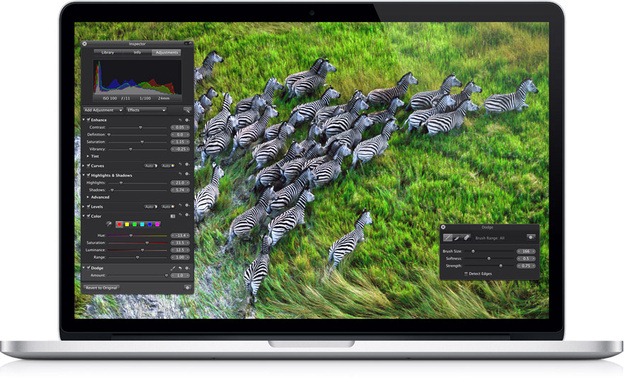
Apple has always been the awesome product manufacturing brand featuring its most energetic product that might have taken its name from land to the limitless sky the iPhone, but well before the iPhone was launched the MacBook from apple was ruling the creative computer users mind who really wanted some more interactive thing than just windows. MacBook Pro 2012 with Retina display is recycling that interactivity with more energy and technology embed into one small thin package.

apple macbook pro 2012

Apple has brought some new improvements and features to their new MacBook featuring a high resolution 15 inch retina display which is the main key feature of this new edition. The older MacBook Pro were having a resolution of 1440 x 900 pixels but this new kid in the block has a whooping 2880 x 1800 pixels resolution which might make your desktop a place for whole time using. Older MacBook's featured a 2.4 GHz Sandy Bridge Quad Processor while the new retina edition comes with a 2.7 GHz Quad Core Ivy Bridge Processor.

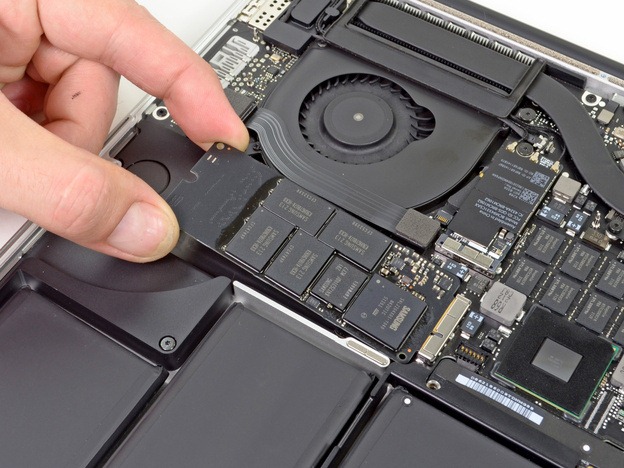
apple macbook pro 2012 hardware

Continues working on your laptop may also take you sometimes to the place where there is no power output source, well surfing internet and doing other minimal task can leave you upto 5 hours of battery life as tested by the professionals. The design is also thin from the older MacBook and has some serious improvements which might let you consider of purchasing this awesome laptop.

How to Tether Jailbreak iOS 5.1 with Sn0wbreeze 2.9.2


iOS 5.1 was released with the release of the New iPad and as soon as it was released the tether jailbreak was also released for it in form of Redsn0w so its working absolutely good but for some reason you want to refer Sn0wbreeze instead of Redsn0w than now you can do that as new version for Sn0wbreeze is released today and it will help you in creating custom firmware for your device which when restored will already have Cydia in it hence your device will be jailbroken.

Now this is obviously the tethered jailbreak that means if your device is rebooted than you have to connect it to your pc to restart it again, else it will be hanged @ the apple logo. So when you will create your custom firmware it will create one .ipsw file and iBooty folder right on your desktop which will help you in booting your device when its restarted.

Sn0wbreeze-2.9.2


How to download Sn0wbreeze 2.9.2 :


Now if you want to download Sn0wbreeze 2.9.2 you can download it directly from this link, its for free provided by iH8sn0w.

How to use Sn0wbreeze 2.9.2 :


Now if you are new to Sn0wbreeze and Jailbreak than this guide will help you in creating your custom firmware with Sn0wbreeze 2.9.2
1. Make sure you have downloaded Sn0wbreeze 2.9.2
2. Now just run it and you will see screen like above displayed.
3. Click on that blue arrow and than you will be promoted to Browse for the .ipsw file officially downloaded so if you have not downloaded firmware you can download it from here.
4. Now it will show you screen like this when you have successfully browsed your firmware file.

Sn0wbreeze-2.9.2-iphone-3GS

5. Now just click on that Blue arrow and you will see screen asking you to choose a mode I will recommend you to go with the Simple Mode as it automatically installs the Cydia and every other essential utility.

Sn0wbreeze-2.9.2-modes

6. Sow now it will ask do you want to Hacktivate your iPhone just click on Yes and than you custom firmware creation will start.

Sn0wbreeze-2.9.2-custom-firmware

7. That’s it now let it do its job and after few minutes you will have your custom firmware and iBooty folder right on your desktop.

8. Now just open your iTunes and than Hold Shift and click on Restore, now browse your custom firmware which will be on your desktop and than let your phone be updated.


Booting Tethered with iBooty :


Now your update process is complete you will need to use iBooty for booting your device in tethered state. So double click on your iBooty folder and than click on iBooty.exe file now it will open iBooty just choose your iPhone and than click on start now follow all the steps as stated and you will be in your device.

So now I hope you all are cleared on how to tethered jailbreak your device using Sn0wbreeze 2.9.2, if you still have any problems than please make sure to use the below comment form so that I can fix that as soon as possible

Apple iOS 6 List of New Features + Video Reviewed


Recently WWDC 2012 event took place where iOS 6 was revealed to the audience displaying its new features which will bring more interactivity to the iDevice. Well so we have combined a whole bunch of list of new features included in the iOS 6 and briefly described them below, plus we have also found a useful video which displays features visually.
iOS 6 Review
Phone App : The entire phone application has been redesigned giving it a more unique style. More over new phone declining features has been added with which you can send a message or you can also setup a callback reminder for that call.
Facebook Features : iOS 6 has also been graceful to the Facebook by adding many features in support to the it.
  • Photo Upload - Now you can easily upload any photo from your iPhone to Facebook or other social network with just a click.
  • Tap to Post - Now updating your status or posting tweet is lot easier with the ability to post right from the notification center.
  • Like Content - Now Facebook Like is also embed into the app store, iBook's and iTunes store, so you can easily like and share with friends.
Facetime : also has been updated with two good features from which one of them was earlier accessible only through a cydia mod.
  • Facebook Over Cellular - Now you can easily call through Facetime with your 3G or 4G network and you do not need to have Wi-Fi.
  • Number/ID Unification - Now you can make calls though your Apple ID’s or by just using your personal phone number.
Siri : has also gone through a major upgrade on iPhone and iPad by adding new features and improving its overall stability and performance.
  • Available for iPad 3 - Siri is now available for iPad 3 but condition is that it must be running iOS 6.
  • Enhanced Searching - Now with Siri on iOS 6 searching is much more improved by adding support to search for restaurants, movie and cinema tickets.
  • Launching Apps - Now you can launch apps though Siri. So now you just have to say open notes and that’s it your notes app will be launched.
Maps : Now as apple has removed Google Maps and have added their own maps tying up with Tom Tom or maybe acquiring it fully. The new maps are entirely redesigned to the suiting's of providing more options to the people using iPhone and iPad.
  • 3D Feature - It’s the top most feature getting viral on the internet as people are using it and reviewing it on their websites. The new 3D feature will obviously not have all the countries supported but still the maps looks fantastic and you will love the other countries and watching their whole living lifestyle.
  • Turn by Turn Navigation - New maps support turn by turn navigation with a loud speaking assistant for more precise navigation.
  • Traffic - Real time traffic estimation is also a new added features, alternate routing can simply decrease your travel time.
Clock : has just got one new feature and its added to the new iPad 3 also.
  • Using Mp3 Alarm Tones - The new updated alarm clock is modified to use Mp3 tones for creative alarming.
  • Available for iPad 3 - As mentioned above its now available for the iPad 3 as a stock app.
App Store : App Store has also been redesigned with a new UI and some awesome features described below.
  • App Store doesn't close - Now hen downloading any application from the App Store it will not close like the Installous use to be.
  • Redesigned - App Store is entirely redesigned with new graphics and much more improved section searching.
Settings : Setting app has also been updated with many new features and improvements, changing some app destinations and adding some more privacy settings.
  • Do not Disturb - is a new feature which helps you in turning off all the push notifications with juts a single toggle options.
  • Bluetooth Moved Outside - Bluetooth option has been moved right onto the settings tab for easier Bluetooth switching on.
  • Privacy Settings - Every app data consumption and accessing is now visible for more privacy option. Now you can see which things are accessed by which app.


iOS 6 Features Review Video :


[Source : ijailbreaknow - Image Source : appolicious - Video : ty’s ihelp]

Friday, 8 June 2012

Installous 5 for iPhone - iPad and iPod Released Download Now


Installous the best way to get all the paid apps for iDevices entirely for free. Well Installous is obviously supported by all the people who purchase those apps and patch the up with Crackulous, well Installous team has released an update for their awesome app which adds some new features listed below.


Now Installous is a must app which you should have in your phone if you have already jailbroken your device with cydia. Because some people do not like to pay for those costly apps then Installous app only helps them at that stage.
Well installing Installous is really simple and is also explained briefly in the above mentioned post but still for short you can install it by adding repo in your cydia mentioned below.

http://cydia.hackulo.us


New Features in Installous 5 Update

  1. BitTorrent download support has been added in this update.
  2. Support for iOS 5 Notifications.
  3. File hosting capability has been improved.
  4. Many Bugs are fixed and speeds are optimized.
So if you already have previous version of Installous installed just head over to the cydia dashboard and click on changes and you will see the upgrade ready to be installed just click on upgrade and than your Installous will be updated.

Friday, 6 April 2012

Physics Based Game for Android and iPhone

Cut The Rope is physics based game which comes in the puzzle category due to its solving nature. Well the main concept of the game to feed the small cute monster “Om Nom” which gets delivered to your doorsteps. The main objective of the game is to drop the small piece of candy into the mouth of that monster and your level will be cleared. Well as you clear further levels you will see a kind of new dimensions that this game is following you will find a unique taste of this awesome game which I must say should be played by you all.
We have uploaded this game for iPhone and your Android device and I must say that you should download this game for some high definition fun.


Download Cut The Rope for iPhone :

You can Download Cut The Rope for iPhone and give it a try, it’s a .rar package so you will need WinRAR to extract it and than you transfer it to your iPhone, but remember that your iPhone should be jailbroken for transferring this app check out Jailbreak Section for more information.

Download Cut The Rope Experiments for Android :

You can Download Cut The Rope Experiments for your Android Device, just download it and than extract it using WinRAR, after extracting it just transfer it to your Android device and install it and than have fun playing it, hope you like this game and enjoy the real physics.